Cloud Uploader CLI
Objective
The aim is to create a bash-based CLI tool that allows users to quickly upload files to a specified cloud storage solution. This is part of a learning phase from https://learntocloud.guide/, a free guide to learn cloud computing. AWS S3 Storage was used in this mini project.
The tool should be able to upload files to cloud provider storage when the command below is ran
clouduploader /path/to/file.txt
Setup
Download AWS Command Line Interface (CLI)
Prepare your AWS Access Key ID and AWS Secret Access Key
Once 1 and 2 are ready, enter the following command in command prompt
aws configureYou will be prompted to enter your AWS Access Key ID, AWS Secret Access Key, Default region name and Default output format.
Create S3 Bucket
Create a new bucket programmatically by entering the following command. The bucket name must be globally unique. In this scenario, the bucket name is wj-demo-bucket1
aws s3 mb s3://wj-demo-bucket1
The following output is seen after the bucket is created successfully.

Bash script to upload file to S3 bucket
Create a directory and save this script in this directory before writing the script. In this case, the name of the script is s3_uploader_cli.sh
The bash script takes in 2 arguments which are filename and the destination bucket. If either of them is not set, an error message will be printed and script will not be executed.
#!/bin/bash

filename=$1
dest_bucket=$2


if [ -z "$filename" ]; then
    echo "File not specified!"
    exit 1
elif [ -z "$dest_bucket" ]; then
    echo "Destination bucket not specified!"
    exit 1
fi
An error message of file not specified when filename is missing
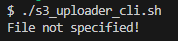
An error message of destination bucket not specified when bucket name is missing

Next, the script checks if the file exists before uploading. A message will be displayed to indicate if the attempt to upload the file is successful.
if [ ! -f "$filename" ]; then
    echo "File not found!"
    exit 1
elif aws s3 cp $filename $dest_bucket; then
    echo "File uploaded successfully!"
else
    echo "File upload failed!"
    exit 1
fi
A failed attempt to upload a file which does not exist

A successful attempt to upload a file with filename of README.md

The file can be seen by listing the files or objects of this bucket

The full bash script is as shown below
#!/bin/bash

filename=$1
dest_bucket=$2


if [ -z "$filename" ]; then
    echo "File not specified!"
    exit 1
elif [ -z "$dest_bucket" ]; then
    echo "Destination bucket not specified!"
    exit 1
fi


if [ ! -f "$filename" ]; then
    echo "File not found!"
    exit 1
elif aws s3 cp $filename $dest_bucket; then
    echo "File uploaded successfully!"
else
    echo "File upload failed!"
    exit 1
fi
Conclusion
Bash scripting is a basic and essential skill to develop in the sphere of cloud computing.
Happy bash scripting :)
My Github Repo
About the author
I am exploring the domain of cloud computing.
Comments
Join the discussionstarting my crypto investment with Adelynn Richardson Fx on (Instᥲ¿grαм/Facebook) is the best decision I made, I was able to earn through Bitcoin investment without making any losses her platform offers the best signal for trading